
What 24 Hours of Bots Tried to Steal From The Website
- piestyx
- Cybersecurity
- May 17, 2026
Table of Contents
France, pourquoi m’as-tu abandonné?
I looked at my Cloudflare stats the other day and wouldn’t you know it, I am gaining popularity in France! Quelle surprise!! Me. Beloved by the French.
I was obviously delighted, albeit a bit surprised to see this, but I am not one to question international recognition when it finally arrives. Stockholm and the Nobel Committee isn’t far from France so the news of my endeavours is slowly making its way there. Maybe the spelling of Orielle got confused with ‘oreille’ and they thought the project was about listening and paying attention; maybe these very blog posts have found a new readership and my acerbic wit translates incredibly well. As any other person aspiring for greatness would do, I checked on the traffic properly so I could really get to know and understand my new audience.
The dream lasted about eight seconds. Tomber à pic.
The Pattern
The first thing that stood out was volume.
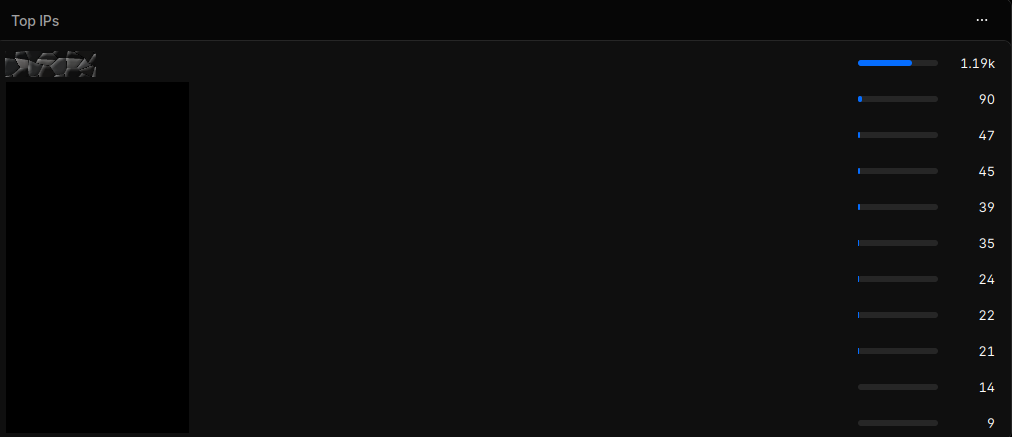
1.19k requests. All from the same IP address.
That is not normal visitor behaviour. That is not someone reading through a website. That is not even someone aggressively clicking around because they are bored at lunch. It is a machine walking paths.
Then the location view made the joke write itself.
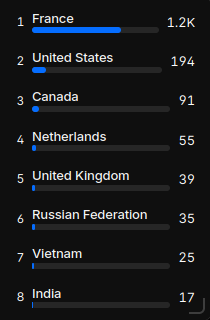
1.2k requests. All from an IP Cloudflare geolocated to France.
So yes, technically, I was getting traffic from France. Or at least from infrastructure that Cloudflare believed was in France, which is much less romantic and much more useful. Sadly, this was less “new audience segment” and more “automated scanner has discovered the domain and is now rattling the door handles”.
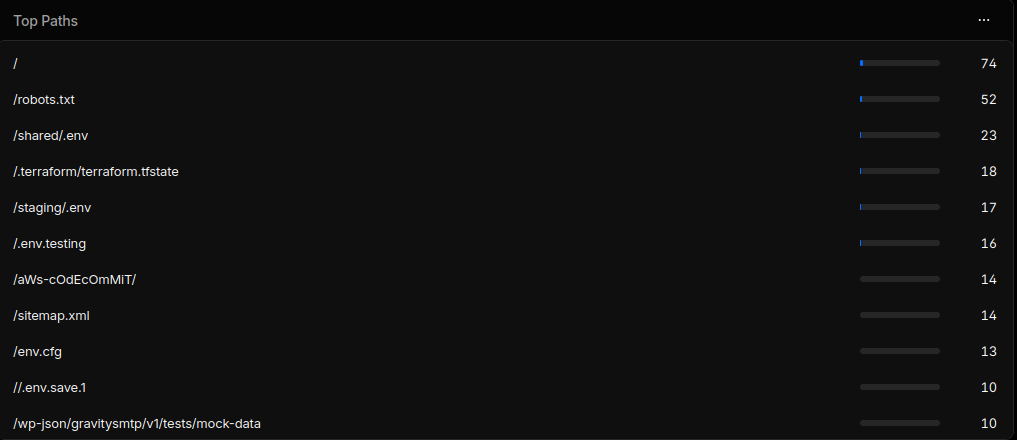
The real giveaway came from the requested paths:
Oh.
I see.
You weren’t interested in my mind at all, you were just interested in probing for my accidentally exposed environment variables and secrets. I could have forgiven some of the lesser indiscretions but this is seriously starting to look intentional now. Those requests are not clustered around normal pages that one can access by navigating through the site, they’re aimed at the kind of paths automated scanners love: configuration files, exposed environments, admin panels, WordPress paths, PHP endpoints, hidden directories. Playing all the greatest hits of “maybe someone deployed this badly” direct through my hypothetical speakers.
It’s not a sophisticated attack because it doesn’t need to be. A lot of hostile internet traffic is just automated opportunism, a bot asking the same question over and over again:
Did this person accidentally leave something valuable on the floor?
Most of the time the answer is no. Sometimes the answer is yes. The bot does not care. It can ask the question a million times. And if there’s a sense that surely this is a problem only limited to those without high reaching cybersecurity budgets keep reading to be disabused of that notion.
The Actual Risk
The obvious target in this kind of scanning is secret exposure. The classic example is .env. If a developer accidentally ships or exposes an environment file, that file might contain API keys, database URLs, tokens, webhook secrets, cloud credentials, private service endpoints, or enough partial information to work out what else to attack. It is boring. It is also serious.
That matters even more now because API keys are no longer just small convenience tokens for harmless integrations. A key that used to identify a frontend Google Maps project, for example, may now sit dangerously close to services with real billing consequences.
Coincidentally, I had recently read an article on The Register about Google Cloud users waking up to massive bills after compromised API keys were used for expensive AI workloads. One user’s normal API bill reportedly escalated into the thousands, with the broader issue being that old assumptions about “safe” public API keys no longer hold cleanly once those keys can touch high-cost AI services.
The linked Truffle Security article puts the core issue bluntly: Google API keys that developers had historically been told were not secrets became much more dangerous once Gemini accepted the same keys. Their research found thousands of exposed Google API keys originally used for public services like Maps that could also authenticate against Gemini. Gemini changed the threat model and in all cases but here especially, an exposed key is not just an “oops, now someone can use my map widget”. In the wrong configuration, it can become “someone can burn real money generating AI content on my dime while I am asleep”. It wasn’t every Maps key, the risk was present where the same Google Cloud API key/project/API configuration permits access.
Lovely stuff. OpenAI introduced ads to generate revenue but I guess Google have their own ways. For legal reasons I would like it known that was a joke.
So when a bot walks a site looking for .env, .git, wp-login.php, random PHP shells, Terraform state, backup files, and forgotten admin panels, it is fishing for credentials, configuration, and sloppy deployment residue. Enough low-effort scanning across enough sites and someone eventually leaves a door open.
Baby’s First Exploit Scan
We tend to have this Hollywood view of hackers, multiple terminal windows open and fingers hammering across the keyboard typing out commands. The darkened room and glow of the monitor really gives off the impression of being the pinnacle of cool in the IT field…

Like I said earlier, this was not an elite operation, it is that first exploit scan that one might fire up when testing the waters. Get a wordlist off a dodgy forum and start running it against public hosts. It’s still hostile, though.
There is a temptation to dismiss what would be considered more unsophisticated attacks because of the fact they are unsophisticated but it’s a dangerous temptation to fall foul of. The internet is full of cheap, automated, repetitive probing precisely because it works often enough to justify itself. It is a method that doesn’t need to beat hardened infrastructure, just hardened developers having a bad day and leaving that forgotten test deployment or debug endpoint reachable that should never have been.
Cloudflare wasn’t just showing me “some traffic”, it was giving enough information to be asking some useful questions about it:
- Why is one IP making over a thousand requests?
- Why is all of that traffic coming from one country?
- Which paths are being requested?
- Are those paths normal content pages or exploit-shaped probes?
- Is this a reader, a crawler, or something poking for secrets?
The answer was about as subtle as a retinal scanner………because it was a scanner.
probelog
After spotting the pattern, and suddenly recovering repressed memories about an unfortunate incident with some aliens, I built a small defensive Cloudflare Worker project called probelog. If scanners are gonna be scanning and hitting public endpoints anyway then I might as well observe the shape of the traffic properly and not retaliate in any sort of way. We could say it is a light “turn-the-tables” type of tool.
The Watcher
It just watches.
Sorry to be an anti-climax but I did mean it doesn’t retaliate. It doesn’t hack back, fingerprint aggressively, serve up fake secrets or in fact do anything clever that would produce a future liability. By light “turn-the-tables” I really mean a very low-interaction decoy endpoint to capture safe metadata to learn a bit more.
The Worker
It’s actually all the same thing but conceptually it works easier this way. The worker receives the incoming requests, extracts safe metadata, classifies the requested path, stores one row in Cloudflare D1, and returns the same old boring 404 to everyone. It didn’t want to be an interesting response back or a custom page to taunt their efforts, I don’t want the scanner to be encouraged to stick around any longer than it was already going to. Just a standard:
Open the door, get on the floor, everybody walk the 404
Secretly and behind the scenes, it records enough to understand the traffic pattern:
| Field | Purpose |
|---|---|
| timestamp | when the probe happened |
| method | usually GET, but worth recording |
| path | the requested path, length-capped |
| query string | recorded raw, length-capped |
| user agent | often revealing, often fake, still useful |
| IP | from Cloudflare’s connecting IP header |
| country | from Cloudflare metadata |
| ASN / organisation | useful for spotting hosting providers or repeat sources |
| Cloudflare Ray ID | traceability |
| category | the local classification result |
Let’s draw the line, and keep it nicely dusted and fully visible up front. Defensive logging should not become data hoarding, accidental or otherwise. The goal is to understand scanner behaviour and the probe patterns hitting public endpoints, not to build a creepy surveillance box for normal visitors. I am deliberately not reading or storing request bodies, cookies, or Authorization headers for that reason.
Classification
There can be some really fancy solutions when it comes to security and safety; but the rules still apply that it shouldn’t be over-complicated just for the sake of it. If a simple solution will do the job, use a simple one. With that in mind the classifier is intentionally boring. The path comes in and gets sorted into one of a few categories:
env_probeterraform_probegit_probewordpress_probephp_probeadmin_probewell_known_probeunknown_probe
Rules are evaluated in order with the first match winning which should avoid obvious classification mistakes where, for example, a WordPress path ending in .php gets dumped into the generic PHP bucket before the specific WordPress rule has a chance to catch it. I was really only interested in one question
What kind of thing was this request trying to find?
So it is a readable set of path checks that answer that question. Not anything like machine learning and nowhere near threat intelligence type stuff. Simple is as simple does……or something like that.
Why Cloudflare D1?
Aggregation. I wanted the admin view to have counts by category, top paths, top IPs, top countries, top user agents and so on. KV would have been fine if I wanted to later manage the “store this one thing under this one key” option, but D1 is there and available so best to use it. Added benefit being the summary can use normal type queries that SQL-heads would be familiar with so it’s just cleaner than listing a pile of keys and aggregating in the Worker. Let the Worker work!
So the structure became:
request comes in
    -> classify path
    -> extract safe metadata
    -> insert event into D1
    -> return harmless 404
The insert runs best effort through ctx.waitUntil, so database storage does not block or change the response path. If the logging fails, the scanner still gets the same dead response.
Again: boring on the outside, useful on the inside.
The Admin Endpoint
The only route that behaves differently is:
GET /__admin/summary
That endpoint requires a bearer token. Without the token, it returns the same 404 as every other request.
With the token, it returns aggregate JSON:
{
  "generated_at": "2026-06-05T12:00:00.000Z",
  "total_requests": 1234,
  "counts_by_category": {
    "env_probe": 410,
    "unknown_probe": 300
  },
  "top_paths": [
    { "value": "/.env", "count": 210 }
  ],
  "top_ips": [
    { "value": "203.0.113.10", "count": 88 }
  ],
  "top_countries": [
    { "value": "US", "count": 540 }
  ],
  "top_user_agents": [
    { "value": "curl/8.0", "count": 120 }
  ],
  "recent_events": [
    {
      "ts": "2026-06-05T11:59:58.000Z",
      "method": "GET",
      "path": "/.env",
      "query": "",
      "user_agent": "curl/8.0",
      "ip": "203.0.113.10",
      "country": "US",
      "category": "env_probe"
    }
  ]
}
Don’t forget, it was only a probe not a full examination security platform implementation so that aggregation is perfectly adequate for my non-nefarious purposes.
Deployment Shape
One slight kink on the shape of the deployment is the decisions around the hostname and how it is deployed. The main website is served through Cloudflare Pages so if I routed the Worker over the usual piestyx.dev/* then it would return 404 for every normal page and then no one in France could read my blog posts even if they did actually want to. It’s a solution to defend against the bots, but it is probably a bit scorched earth as a response to the attack vector.
The safer deployment model is a decoy hostname:
decoy-hostname.piestyx.dev
The normal website stays where it is. The trap hostname gets the Worker. Any scanner that discovers and probes the trap hostname gets observed, classified, logged, and served the boring 404.
Et voilà, that keeps the production site separate from the monitoring surface.
The better way would be a Pages Function inside the Hugo site repo which would then allow me to observe probes that hit the real apex domain. If the function could log only recognised probe categories and then call context.next() to allow normal website traffic to continue untouched it would give two useful modes:
decoy-hostname.piestyx.dev
    -> isolated scanner observation

piestyx.dev
    -> normal site, optionally with passive probe logging middleware
No catch-all Worker sitting in front of the whole website like Lennie treating every request like his puppy.
What I Did Not Build
Just as important as what probelog does is what it refuses to do:
- Block IPs.
- Rate-limit.
- Serve decoy secrets.
- Try to identify individual people.
- Escalate.
- Pretend to be a WAF.
If I need enforcement, Cloudflare already has tools for that. The point of this project was for my own learning and create some visibility. Small, auditable, defensive visibility. I think there is a strong temptation with these types of projects to get theatrical, which then leads to my earlier over-complicated solutions point. Suddenly every scanner is an “attacker”, every request is a “campaign”, and every hobby project becomes a “threat intelligence platform”. This was one IP making a lot of suspicious requests. I just noticed and wanted to understand the pattern, reduce any obvious exposure, and build a small tool to observe future probing without creating extra risk.
What This Actually Taught Me
Mainly that it is actually pretty useful to log in to the Cloudflare dashboard once in a while and check the statistics of what’s going on over there. Don’t get an e-mail notification for something that is comparitively tiny traffic, unnoticeable even to their wider landscape; so it is good to check. Just because your small personal website feels like barely a drop in the ocean of the Internet doesn’t mean it sits outside the same hostile background radiation as everything else. A bot doesn’t care that a site is personal or static or that there is probably nothing useful there at all, but still they probe. And for that fact, basic observability and understanding becomes valuable.
Metrics are not vanity when you can interpret them in more ways than “number go up, that good”. Logs are not noise when you know what question you are asking. A spike in traffic is not automatically popularity. Sometimes it is just an annoying little curl freak in a rented box checking whether you left your wallet under the doormat.
That lesson was useful. The other global lesson though……
Never trust the French.
- piestyx