“IT’S ALIVE! IT’S ALIVE!!”
“Unable to endure the aspect of the being I had created, I rushed out of the room and continued a long time traversing my bed-chamber, unable to compose my mind to sleep.” - Frankenstein by Mary Shelly
Alright so it wasn’t quite that dramatic but the sentiment still stands. Last night was the event horizon except I need eyes where I’m going. Damn that’s a good film, you should go watch it if you haven’t seen it before. The breach point was confirmed shortly after midnight when the gameplay loop ran fully WITH the voice output and the avatar movement. It was surreal to see it finally all click together after debugging trace backs and rewriting the LLM logic.
What’s New?
Voice Pipeline
Since the previous devlog entry I have now integrated the voice pipeline and the avatar integration. That means those responses that were coming out the LLM before are now not just being returned to the action logging and execution functions within the qud_gameplay module, they are also routed straight into the
index-tts
loop where they are modulated and returned as audio playback using ffplay. I added a function into the indextts class that uses the existing split sentences to pass out the audio in generated chunks instead of waiting until the full inference loop has been completed and the whole of the response audio is generated. Modulation currently uses a 7 second sample voice so there will always be that 7 second latency as it maps the waveforms against the sample to output, but, by doing it with this method it has the potential to reduce the perceived latency of the response dramatically. The benefit compounds as the length of the response grows so it’s really valuable to have in place for a more rapid response that is just an emulation of speaking while thinking.
Fixing that voice latency issue was a big win for the response times but doesn’t do anything to address the length of time in the LLM generating the response. Well we can do the same process with the LLMRunner - another benefit of using a direct approach with something like llama.cpp over Ollama in my particular circumstance as it provides the control to be able to make these changes. The LLMRunner now creates an ASync sub-process that pipes out the stdout and stderr to a specific buffer size, the output of which can then be pulled into both the voice pipeline and executor.py. This mirrors the chunked voice output process of buffered reads streamed progressively to reduce wait time, especially beneficial at a larger response size.
There may well be other more elegant ways of doing what I have described above, and the biggest save would probably be downgrading from the current quantized 13B parameter model for something more friendly on my GPU. I’ll wait to see how it feels with extended play first.
Avatar Integration
I have also now been able to get the avatar integration set up so that the audio playback mentioned above also triggers a mouth movement on a Live2D model within VTube Studio. Normally this software package would use a webcam or a mobile phone camera to track the user’s face to then map it against the model rig. There’s a snap below showing how it looks within Live2D - they have a wealth of information at the
Live2D Docs
.
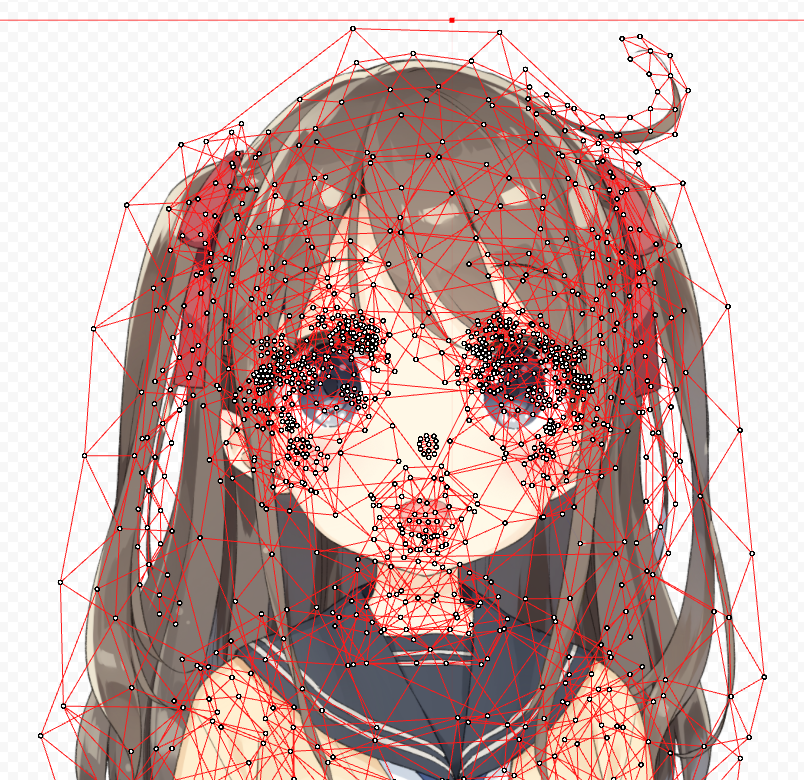
You’re essentially mapping the model’s mesh vectors to your facial motion vectors so when you raise your eyebrows the model raises its eyebrows. This project, though, is using an AI so there is no face to map (no, I’m not sitting there in silence controlling the face), so how does the mouth move? VTube Studio allows for the creation of plugins and custom parameters, so once I authorised the plugin in Vtube Studio it allowed the mouth movements to be synced via a websocket API. The same principle would apply to other expressions or natural body movements such as the body moving along the y axis with breathing … which is probably the strangest way I have ever thought about breathing. If you wanted to see the rigging process in action then I would recommend this
BriAtCookieBox
video, she does the rigging on her own model and is shit-hot at it to put it bluntly.
I will hasten to add here that I have not decided that I would also take up Live2D and design and rig a model to use. All I have done is buy the model files and a non-exclusive right to use them from
Aka Huhu
of GALAXY project.
There’s still fine-tuning required to simulate phoneme movement more naturally during playback … plus a few little extras I’m considering. All of that is for another day though. With these additions, how does the flowchart look now???
graph TD
    subgraph Game_Caves_of_Qud
        qud_engine["Qud Engine"]
        log_output["message_log.txt"]
        status_json["status JSONs: hp, status, zone, inventory"]
    end

    subgraph AI_Runtime
        watcher["perception.py - Log Watcher"]
        buffer["event_buffer - context memory"]
        prompt_builder["prompt_builder.py - build_prompts()"]
        runner["llama_runner.py - LLMRunner"]
        action_parser["action_parser.py - parse_action()"]
        inventory_parser["inventory_parser.py - parse_inventory_action()"]
        executor["executor.py - decide_and_act()"]
        tts["infer.py - stream_infer()"]
        avatar_sync["vtube_sync.py - VTubeStudioClient"]
    end

    subgraph LLM_Model
        model["llama-run: *chosen model*"]
    end

    qud_engine -->|Appends events| log_output
    qud_engine -->|Exports state| status_json
    log_output --> watcher
    status_json --> buffer
    watcher --> buffer
    buffer --> prompt_builder
    prompt_builder --> runner
    runner --> model
    model --> runner
    runner --> action_parser
    runner --> inventory_parser
    action_parser --> executor
    inventory_parser --> executor
    executor -->|Inject command| qud_engine

    %% New additions
    runner -->|LLM output| tts
    tts -->|Audio stream| avatar_sync
    tts -->|Play via ffplay| qud_audio["Audio Output"]
It’s Tricky Tricky Tricky Trrrrrricky
It was not smooth sailing though, and I had already expected that to be the case. Effectively trying to tie together 4 different elements:
- Gameplay loop
- LLM function
- Voice pipeline
- Avatar integration
This is not a scenario where AI assisted coding shines, from my experience, as the LLM is not “remembering” the content of files that have been generated or code that has been implemented and is working. Realistically it could be engineered to be a more pleasant experience by first mapping out and understanding the exact requirements for each integration step, and then crafting a prompt and providing the context of existing code which would then provide the focus solely into what is already in place … I wasn’t prepared to put that level of effort in on this occasion, which in hindsight was pretty dumb.
To give an example of the impact this had, there is a specific file prompt_builder.py which handles the building of the prompt for the LLM by consolidating log entries as a context type and then building around a system_prompt, instruction_prompt and user_prompt. It’s a masterful piece of engineering really … (it’s not, it’s a simple thing but keeps functions more isolated and I love isolation) … Well this prompt_builder.py wasn’t mentioned enough clearly when I started going through the process of chopping up the LLM responses and chunking the outputs to the voice; because I got to the end to test and realised that my beautifully crafted prompt that had been generating some good responses was now throwing out a stream of syntax which, while sounding lovely, was not optimal. The changes had bypassed the prompt_builder.py because the instruction was to solve a problem without explicitly giving clear architecture constraints or context.
I got it working so it was a midnight annoyance more than anything but it was still an annoyance I probably didn’t need to deal with but chose to. If anything it is just a test of my increasing ability to be able to break something and then debug it and attempt a fix before resorting to mindless AI reliance. I don’t believe reliance on the tool should ever be an end-goal with the vibes, it’s a really good Swiss army knife but you don’t use one of them if you’re facing down a ferocious bear in the woods. This implementation phase was a good reminder that it’s easy to get carried away with the vibe sometime but fundamentally everything should be backed by a clarity of purpose and a solid understanding of the architecture.
#qudlocked
What’s next then? There’s some fine tuning to do before we can truly be #qudlocked but majority implementation is complete for phase 1.
Stay tuned.
piestyx